
A church service today is not limited to what happens on the stage. Lyrics, Bible passages, announcements, videos, photos, sermon materials, and countdowns can all become an important part of how a congregation follows the service. When these elements are displayed clearly and at the right moment, they support worship instead of distracting from it.
WorshipScreen is a free browser-based church presentation tool created to make this part of the service easier. It brings worship songs, Bible verses, slides, images, videos, and a timer into one workspace. Instead of using several separate programs, a church media volunteer can prepare and control the visual content from a single interface. The service works through a browser, so there is no need to install complicated desktop presentation software.
What Is WorshipScreen?
WorshipScreen is designed specifically for displaying visual content during church services. Its main purpose is to help the worship or media team prepare everything that the congregation needs to see and then control that content while the service is happening.
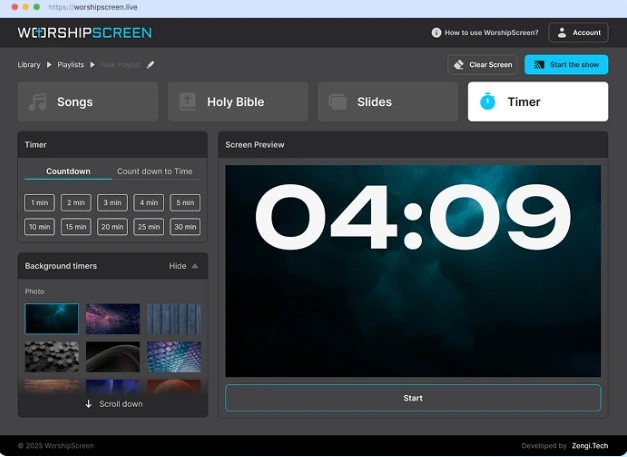
The platform includes four main sections: Songs, Bible, Slides, and Timer. Songs can be stored in a reusable library, Bible passages can be prepared before the sermon, slides can contain announcements and other media, and the timer can be used before the service or during transitions.
This makes WorshipScreen more than a simple lyrics projector. It can serve as a universal visual presentation workspace for an entire church service.
For a small congregation, this can be particularly useful because one volunteer can manage the presentation without having to learn several professional programs. For a larger church, the same approach can help organize the work of a worship or media team and create a repeatable preparation process.
A Free and Universal Tool for Church Presentations
One of the most practical advantages of WorshipScreen is that it is available as a free service. The platform describes itself as free church presentation software, with optional donations supporting further development. A church needs an internet connection and a compatible display, projector, or TV to use it.
If you are looking for free worship software that can handle more than song lyrics, WorshipScreen combines several common church presentation tasks in one place.
There is no need to prepare a separate file for every Sunday. A church can gradually build its own song collection, create a playlist for each service, add Scripture passages, upload images and videos, and reuse previously prepared material. This approach can significantly simplify weekly preparation because the team does not have to start from an empty presentation every time.
The browser-based format is also important. Instead of installing software on a particular computer, the service can be opened in a browser. The presentation can be displayed through a computer connected to a projector, TV, or LED screen, while the operator controls the content from another screen. A compatible television can also open the presentation directly in its browser.
How to Start Using WorshipScreen
Getting started does not require a complicated technical setup. The basic workflow consists of creating an account, preparing content, building a playlist, connecting the display, and starting the presentation.
1. Create an Account
The first step is to create a WorshipScreen account and open the dashboard. Before preparing the first service, it is useful to review the basic visual settings.
The platform provides options for font, text color, alignment, positioning, and the default background. Setting these elements in advance helps create a consistent appearance for different services.
A default background is especially useful during moments when no active content needs to be displayed. For example, a church logo, welcome image, or simple branded background can appear between songs, before the sermon, or during a transition.
2. Connect the Screen or Projector
WorshipScreen can be used with different types of church display equipment. One common setup is a laptop connected to a projector, television, or LED screen through HDMI.
When possible, an extended-display configuration is useful. The operator can keep the WorshipScreen controls on the laptop while the congregation sees only the presentation on the second display. This prevents settings, browser tabs, and controls from appearing on the main screen.
Another option is to open the presentation directly in a compatible TV browser. The laptop, tablet, or smartphone can then be used as the control device.
Before the service begins, always test the connection and make sure the correct screen is displaying the presentation.
Build a Church Song Library
One of the most useful features of WorshipScreen is the ability to create a reusable song library.
Instead of preparing the lyrics for the same worship song every week, the song can be added to the collection once and then reused in future playlists. A new song can be created by entering its title and lyrics. Saved songs can later be edited when corrections or changes are needed.
This creates a simple long-term workflow for the worship team.
When a new song is introduced, add it to the library. When the next service is being prepared, simply add that song to the appropriate playlist. If the arrangement changes, the lyrics can be edited without recreating the entire presentation.
WorshipScreen can also automatically generate slides from a block of lyrics. However, automatic formatting should always be checked before the service. Musical phrases, verses, choruses, and bridges may need to be arranged manually so that the congregation can follow the song naturally.
Prepare Lyrics for Easy Reading
The purpose of displaying lyrics is not to put as much text as possible on the screen. The goal is to make the next phrase immediately understandable.
Keep slides concise and avoid unnecessary text. Line breaks should follow the natural structure of the song rather than simply splitting sentences at arbitrary points.
It is also important to check readability from the back of the church. A font that looks large on a laptop may become difficult to read on a large screen from several rows away.
Background images should support readability rather than compete with the lyrics. WorshipScreen allows churches to use backgrounds for songs and can work with photos, uploaded videos, and YouTube videos.
A consistent visual style is often easier for the congregation to follow than constantly changing colors, animations, and backgrounds.
Add Bible Verses for the Sermon
WorshipScreen is also designed to display Scripture during a church service.
Bible passages can be added to the playlist using the selected Bible translation. If the pastor’s sermon notes are available in advance, the media operator can prepare the expected passages before the service begins.
For example, a sermon might include several references from different books of the Bible. Preparing those passages beforehand means the operator does not have to search for each reference while the pastor is already speaking.
At the same time, church services can change. A pastor may mention an additional passage that was not included in the original plan. WorshipScreen allows another Bible verse to be added while the presentation is running. Prepared verses can also be navigated using previous and next controls.
This combination of preparation and flexibility is important. The presentation should be ready before the service, but the operator should still be able to respond when the service takes an unexpected direction.
Use Bilingual Lyrics and Scripture
Churches with multilingual congregations can use WorshipScreen to display content in two languages at the same time.
Bilingual display can be useful for worship songs as well as Bible passages. For example, the original lyrics can appear together with a translated version, allowing people with different language backgrounds to participate in the same service.
The same principle can be applied to Scripture. Two language versions can remain visible without requiring the operator to switch between separate presentations.
When using bilingual content, readability becomes even more important. Both language versions should have enough space, appropriate font sizes, and clear contrast. The slide should remain simple rather than becoming overloaded with information.
Add Announcements, Photos and Videos
A modern church presentation often includes much more than worship lyrics and Bible verses.
WorshipScreen allows users to add images, uploaded video files, and YouTube content to the service workflow. This means announcements, event graphics, photographs, sermon materials, and videos can be managed from the same presentation environment.
For example, a single service playlist might include a countdown before the beginning, several worship songs, an announcement about an upcoming church event, a short video, and Scripture passages for the sermon.
Keeping these elements together makes the presentation easier to operate. The volunteer does not need to constantly switch between unrelated applications.
Videos should always be tested before the service, especially when they depend on an internet connection or YouTube. A stable internet connection is an important part of a browser-based workflow.
Use the Timer Before the Service
The built-in timer can help organize the period before a service starts.
WorshipScreen supports a standard countdown, such as five minutes, as well as a countdown toward a specific time. A photo, video, or YouTube background can also be used with the timer.
A countdown gives people a clear visual indication that the service is about to begin. It can also help the worship team coordinate the start without relying on someone to manually update a slide every minute.
The timer does not need to be visually complicated. Large, readable numbers and a simple background are usually enough.
Create a Playlist for Every Church Service
Once the song library and other content are ready, create a playlist for the upcoming service.
A playlist can contain the material needed for a particular event, such as a Sunday worship service, youth meeting, prayer gathering, special celebration, or sermon.
Prepare songs in their expected performance order. Add Bible passages in the order in which they are likely to be used. Upload announcements, photos, and videos, and configure the timer if it is needed.
It is also useful to give every playlist a clear name. Instead of leaving automatically generated names, use something that identifies the service and date. This makes older playlists much easier to find later.
Test Everything Before Going Live
Preparation is one of the most important parts of a successful church presentation.
Before people enter the room, run through the complete playlist on the actual display. Do not rely only on what the presentation looks like on the operator’s laptop.
Check the order of songs, lyrics, Bible translations, Scripture references, backgrounds, photos, videos, and timer settings. Make sure the text can be read from the back of the room and that the correct content appears on the congregation’s screen.
It is also important to test transitions. When one part of the service ends, the last lyric slide should not remain on the screen unnecessarily. A default background or church logo can provide a clean visual transition.
WorshipScreen for Different Churches and Worship Teams
The same workflow can be adapted to churches of different sizes and worship styles.
A small church may use one laptop and a projector with a volunteer controlling the presentation. A larger congregation may have a dedicated media team operating an LED wall and preparing content for several services.
The software can also be useful for churches with multilingual services. Because songs and Bible passages can be displayed in two languages, it can support congregations where members have different language backgrounds.
For Methodist congregations searching for methodist worship software, the same core workflow can be used to prepare hymn or worship lyrics, Scripture, announcements, videos, and sermon-related slides. The tool is not limited to one denomination or a specific worship format; its purpose is to organize visual content for church services.
Control the Presentation During the Service
Once everything is prepared, the operator can start the presentation and control what appears on the main display.
The most important skill is timing. The operator should follow the worship leader, musicians, pastor, and overall service flow rather than simply changing slides at fixed intervals.
For songs, the next lyric should appear before the congregation needs to sing it. If a slide changes too late, people may already be singing the next line. If it changes too early, they may lose their place.
During the sermon, the same principle applies to Bible passages. It is better to display a verified reference a few seconds later than to show the wrong chapter or verse immediately.
Be Ready for Changes
A church service rarely follows a plan with absolute precision.
The worship leader may decide to repeat a chorus. The pastor may introduce another Scripture reference. An announcement may be added, or a video may need to be shown unexpectedly.
WorshipScreen provides the flexibility to make changes while the presentation is being managed. Songs and Bible passages can be added, and lyrics can be edited from the playlist view.
However, live editing should be treated as a backup rather than the normal preparation method. The more material that is prepared beforehand, the easier it is for the operator to react calmly when something changes.
A Simple Weekly Workflow
After the initial setup, using WorshipScreen can become a repeatable weekly routine:
- Add new worship songs to the song library.
- Create a playlist for the upcoming service.
- Add songs in performance order.
- Prepare the expected Bible passages.
- Add announcements, photos, and videos.
- Select appropriate backgrounds.
- Configure the countdown timer.
- Test the complete presentation on the actual display.
- Start the presentation before the service begins.
- Follow the service and change content at the appropriate moment.
- Use the default screen during transitions.
- Make live changes only when the service requires them.
This approach turns presentation preparation into a predictable process instead of a last-minute technical task.
Why a Unified Church Presentation Tool Matters
The main value of WorshipScreen is not simply the ability to put lyrics on a projector. Its broader purpose is to bring the visual elements of a church service together.
Songs, Scripture, announcements, images, videos, and timers can be prepared within the same browser-based environment. A reusable song library reduces repetitive work, playlists organize individual services, and live controls allow the operator to respond when the program changes.
For churches that want a straightforward presentation workflow without complicated desktop software, a free browser-based solution can provide the essential tools needed for weekly worship services. WorshipScreen combines those functions in one place while keeping the interface focused on practical church presentation needs.
A well-prepared presentation should not compete with worship, preaching, prayer, or fellowship. It should quietly support them. When lyrics are ready before the song begins, Scripture appears at the right moment, announcements are easy to find, and transitions look intentional, the technology becomes almost invisible.
That is the practical role of WorshipScreen: to help churches prepare and control the visual side of a service in one accessible environment, from the first song and opening countdown to the final Bible verse and closing announcement.